Building a WhatsApp-to-Odoo Flow With JengaFlow and n8n
Turn WhatsApp messages into Odoo Sales Orders automatically. Here is the blueprint for building a no-code automation flow with JengaFlow and n8n.
Most business owners in Kenya live in WhatsApp. It’s where orders are placed, receipts are shared, and customer support happens.
But for many, that’s also where the data stays—locked in a chat thread. Manual entry from WhatsApp into an ERP (like Odoo) is a recipe for errors and burnout.
At JengaStack, we built JengaFlow to bridge this gap. Here is how you can build a fully automated flow that turns a WhatsApp message into a confirmed Odoo Order using n8n and our managed infrastructure.
The Workflow Blueprint
The goal: A customer sends a message like "Order 5 Bags of Cement", and by the time you open your Odoo dashboard, the Sales Order is already drafted.
Step 1: The WhatsApp Trigger
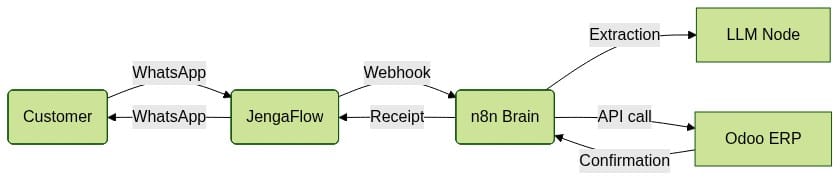
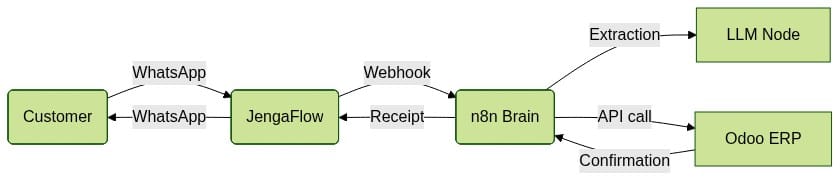
We use the WhatsApp Business API (via JengaFlow) to listen for incoming messages. JengaFlow acts as a secure webhook relay, converting the complex Meta JSON payload into a clean format that n8n understands.
Step 2: The "Brain" (n8n)
Inside n8n, we use a simple logic chain:
- Extraction: Use an AI node (or simple regex) to pull the product and quantity from the text.
- Lookup: Check Odoo if the customer’s phone number exists. If not, create a new Contact.
- Creation: Call the Odoo API to create a
sale.order.
Step 3: The Receipt
Once Odoo confirms the order, n8n sends a WhatsApp message back to the customer:
"Thanks, Kamau! Your order #SO123 for 5 Bags of Cement is confirmed. Please pay via the M-Pesa prompt on your phone."
The Automation Diagram
Why JengaFlow?
You could build this yourself, but Meta’s API is notoriously difficult to maintain (token rotations, template approvals, webhook verification).
JengaFlow handles the "boring" parts:
- Persistent Tokens: No more 24-hour token refreshes.
- Template Management: Pre-approved Kenyan business templates (Receipts, Alerts).
- Managed n8n: Your automation engine runs on the same isolated VPS as your Odoo instance.
The ROI of "Text-to-Order"
For a retail business processing 50 orders a day, this automation saves:
- 10+ Hours/Week of manual data entry.
- Zero Errors: No more mistyped quantities or forgotten orders.
- Faster Payments: Because the order is created instantly, the M-Pesa prompt can be triggered immediately.
Final Thought
In 2026, your ERP shouldn’t be a destination you visit; it should be an engine that works where your customers are.
Stop fighting the chat. Start automating the flow.
Want to try this workflow? Book a JengaFlow demo here.